Groups and priority
A baseline can reach a user directly, through a scheme deployed to them, or through an Azure group, and a user can belong to several groups that disagree. Octiga resolves these routes in a set order, and you decide the priority of the groups it tracks on the Groups page.
Resolution order
Section titled “Resolution order”For each baseline that reaches a user, Octiga checks these routes in order and uses the first one that applies:
- Direct value — a value applied to this specific user. Always wins.
- The user’s Managed scheme — a scheme deployed Apply as managed to this user, if it carries this baseline.
- The highest-priority Azure group the user belongs to, that applies this baseline.
- Not applied — none of the above supplied a value.
Values from lower routes are kept as provenance: Octiga can show what a user would have had from them, but they have no effect. What the user has now is the winning value alone.
The priority stack
Section titled “The priority stack”Tracked Azure groups form an ordered stack, and a higher group wins.
Every user in the tenant belongs to the Default group. It’s pinned to the bottom of the stack and can’t be reordered or removed, so every tracked user has at least one group source.
Group-direct baselines
Section titled “Group-direct baselines”You can also add a baseline to a group by hand, alongside anything a scheme supplies: the group equivalent of adding a Direct baseline to a user. A group’s effective set is its scheme-supplied baselines plus its own group-direct ones. See Adding a baseline for how.
A group can still be Managed by only one scheme at a time. That rule covers deploys, and adding one baseline by hand isn’t a deploy. A group-direct baseline resolves at the group’s own priority, the same as a scheme-supplied one, and a user’s provenance names the group either way.
Unlike a user’s Direct value, a group-direct baseline can’t take precedence over one the group’s own scheme already supplies. The picker marks those as already added and doesn’t let you select them, so the two sets never overlap.
The Groups page
Section titled “The Groups page”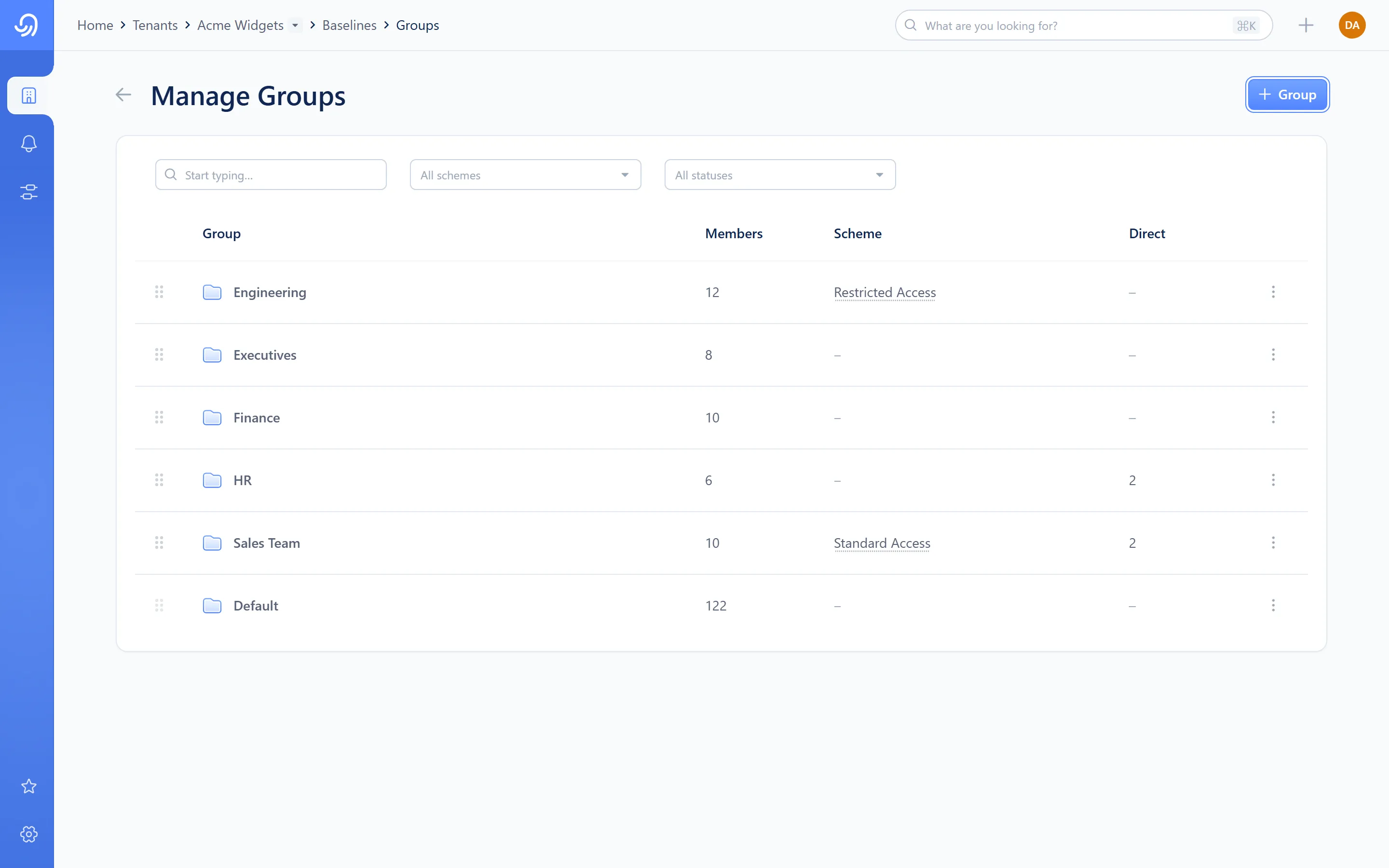
- Drag handle — reorder priority
- Group name and member count
- Scheme — the deployed scheme, if any
- Direct — the group’s own hand-added baseline count
- Row kebab — Deploy scheme, Detach, Remove
Default is always the last row and can’t be dragged. Every other group can be reordered, deployed to, or removed from tracking.
The group’s own detail
Section titled “The group’s own detail”Opening a group shows its baselines and its members.
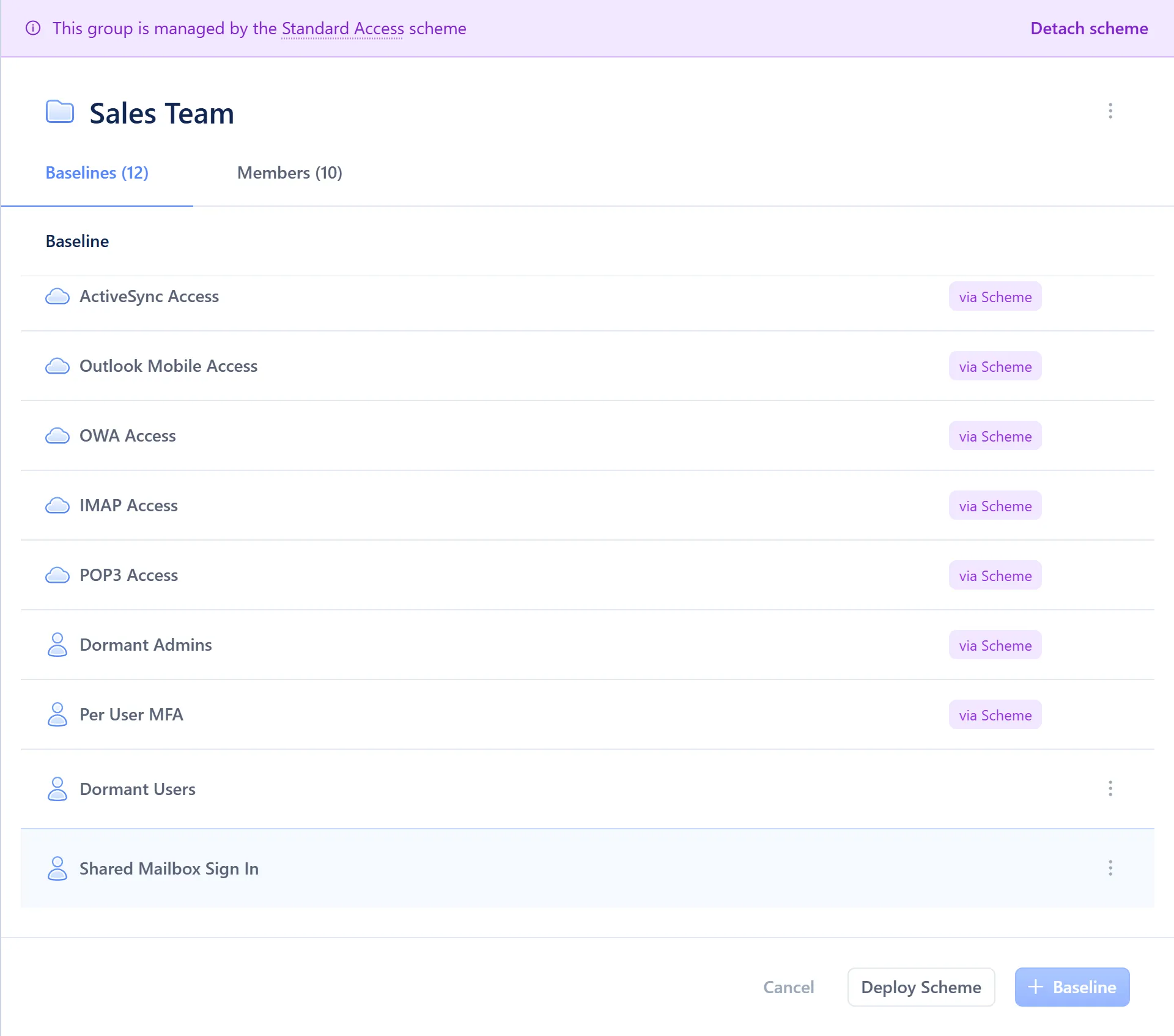
- Baseline table — a “via Scheme” tag marks scheme-supplied rows; an empty cell marks a group-direct one
- Footer — Deploy Scheme and + Baseline
The roster’s four states
Section titled “The roster’s four states”A user’s baselines are in one of four states, depending on whether they’re in a tracked group, hold Direct values, both, or neither:
| State | Meaning |
|---|---|
| Group only | Every applied baseline the user has comes from a group |
| Group and Direct | The user has group-sourced baselines and at least one Direct value |
| Direct only | The user isn’t in any tracked group beyond Default, so only Direct values apply |
| Unmanaged | The user has no applied baselines at all |
A user has no single source: source is recorded per baseline. The four states describe the mix of what a user has, not where each baseline came from.
Detach behaviours
Section titled “Detach behaviours”- Detaching a scheme from a group offers a choice. Keep and unlink leaves the group’s current baselines in place as its own group-direct set, no longer tracking the scheme; Delete baselines clears them. Either way, baselines you added to the group by hand stay, because they were never the scheme’s.
- Detaching a user’s Managed scheme re-resolves each baseline the scheme supplied: it falls to whichever group would otherwise win, or to not applied if the user has neither a qualifying group nor a Direct value. Nothing is deleted; it reverses deploying the scheme to that user.
Vocabulary
Section titled “Vocabulary”- Direct
A value applied to one specific user or, group-side, a baseline added to one specific group by hand. Always wins for a user.
- Supersedes
Provenance language only: “Direct supersedes Finance’s value” describes what’s kept for display, not an action you take.
- Effective value
The winning value: the one Octiga enforces and displays for a user’s baseline.
- Provenance
The winning value plus everything it superseded. Octiga keeps it and can display it, but only the winner has any effect.
- Default group
The group every user in the tenant belongs to. Always pinned to the bottom of the priority stack.