Licence requirements
Some baselines only work when the client tenant holds a particular Microsoft licence.
The requirement is always on a service plan rather than a bundle name: Octiga checks for “Entra ID P1”, not for “Microsoft 365 Business Premium”. It doesn’t apply a baseline to a tenant that lacks its licence. A user who lacks a licence a baseline needs is excluded from that baseline’s checks rather than reported as failing. Octiga doesn’t warn you when a licence is missing; the lists below and the Service plans fact on every baseline show what each baseline needs.
Licence groups
Section titled “Licence groups”Five groups of Microsoft licences gate baselines.
Entra ID P1 or P2
Section titled “Entra ID P1 or P2”Needed by every Conditional Access baseline, and by dormant-account detection. Either Entra ID P1 or Entra ID P2 satisfies this; no baseline in Octiga requires P2 specifically.
Conditional Access Policy
- Block Legacy Authentication
- Enforce MFA
- Require Approved Client Apps
- Application Enforced Restrictions For Unmanaged Devices.
- Require Compliant Or Hybrid Azure AD Joined Device.
- Block Unknown Or Unsupported Device Access
- No persistent Browser Sessions
- Restrict Access To Azure Portal
- Restrict Access To Microsoft Admin Portal
- Sign-In Risk-Based Multifactor Authentication.
- Securing Security Info Registration
- Octiga Generic Conditional Access Policy
- Legacy Auth Conditional Access Policy - DEPRECATED NAME
- MFA Conditional Access Policy - DEPRECATED
Access Management
Intune
Section titled “Intune”Needed by every device compliance and device configuration baseline.
Intune
- Android Enterprise - Compliance Policy
- iOS/iPadOS - Compliance Policy
- MAC OS - Compliance Policy
- Windows 10 Or Later - Compliance Policy
- Windows 10 or later Configuration Policy - Block Password Saving In Google Chrome
- Windows 10 or later Configuration Policy - Block Password Saving In Microsoft Edge
- Windows 10 or later Configuration Policy - Windows LAPS Policy
SharePoint Online
Section titled “SharePoint Online”Needed by external sharing, link expiry and storage-warning baselines.
Sharing
Remote Access
Defender for Office 365
Section titled “Defender for Office 365”Needed by Safe Links and Safe Attachments, and by the SharePoint infected-file-download baseline.
Email Security
Sharing
Customer Lockbox
Section titled “Customer Lockbox”Needed by the Customer Lockbox baseline alone.
Access Management
How to see what a baseline needs
Section titled “How to see what a baseline needs”Every baseline picker has a Service plans column. A dash means no licence is required; a number opens a tooltip listing the specific plans, and any one of them satisfies the requirement.
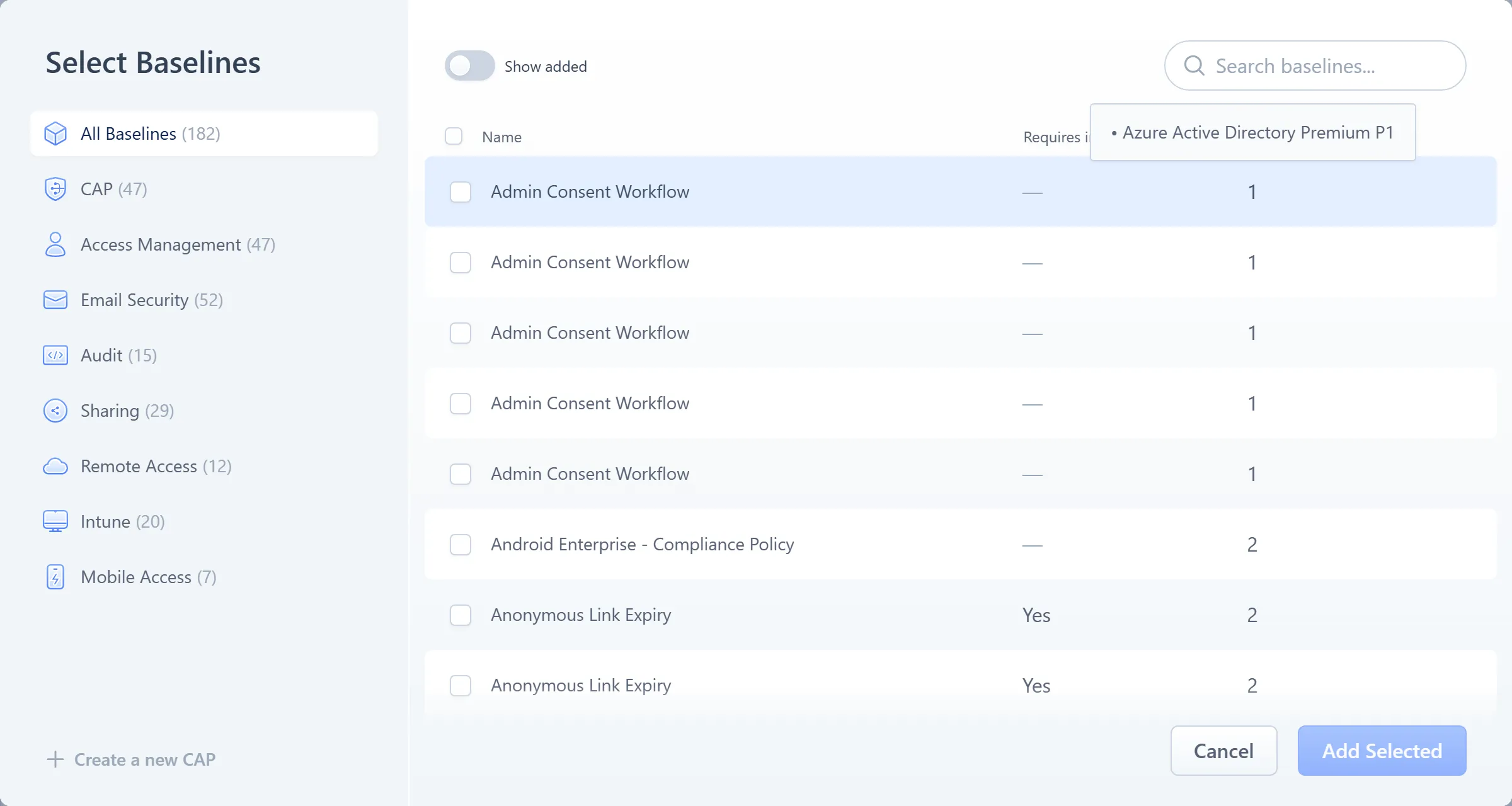
- The Service plans column: a dash means no licence is required; a number opens the tooltip
The same fact appears on the baseline’s own page, in its metadata header row.
What “skipped for licence” means
Section titled “What “skipped for licence” means”When you deploy a scheme, the result shows how many baselines were skipped for licence. This is a quiet exclusion, not a failure: the tenant (or the user) doesn’t hold a licence one of the incoming baselines needs, so Octiga left it out rather than apply something it can’t check. Deploying a scheme covers the rest of the deploy result, and Deviations shows what an excluded user looks like day to day.