Account risk
Account risk is a tenant’s per-user to-do list of identity findings: accounts nobody’s watching, admins without a second factor, mailboxes that behave like people they aren’t. Come here to work through what needs fixing for one tenant, one finding at a time.
The risks
Section titled “The risks”Each row on this screen is one finding: one risk against one user. A user with three open findings appears as three rows.
| Risk | What it means, and the usual fix |
|---|---|
| MFA missing | No second factor enrolled, so a stolen or guessed password is enough to sign in. Fixed by deploying the MFA baseline as a scheme — see Deploying a scheme |
| Admin with mailbox | A licensed admin account that also receives email, one phish away from full control. Fixed by resetting the password while you move admin rights to a separate, unlicensed account |
| Anonymous admin | An admin login not tied to a named person, such as admin@. Fixed by resetting the password while you give each admin their own account |
| Dormant account | Not signed in for months but still enabled. Fixed by blocking sign-in |
| Dormant admin | An admin account unused for months — the account an attacker hopes to find. Fixed by blocking sign-in |
| Shared mailbox sign-in | A person-style login shared by several people, with no audit trail of who sent what. Fixed by blocking sign-in |
| Guest access | A dormant guest, a guest holding an admin role, or an invitation never accepted. A dormant guest is fixed by blocking sign-in; the other two have no built-in fix, so remove the account or its access directly in Microsoft 365 |
A mailbox whose name looks like a role rather than a person (reception@, accounts@) is called out on that user’s sheet as a hint rather than a risk. It’s worth a look, but it doesn’t raise a finding or count towards these totals.
The screen
Section titled “The screen”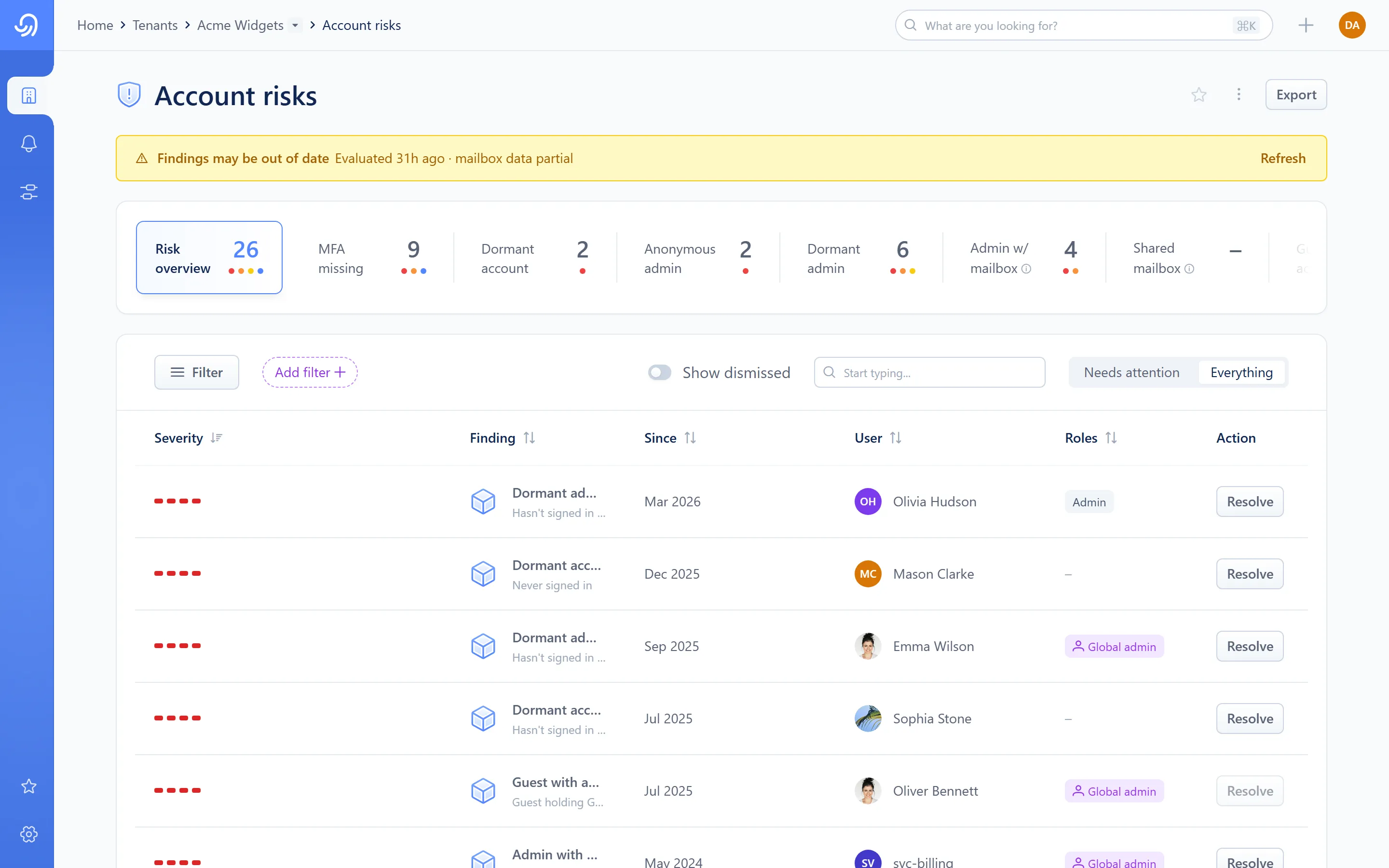
- The risk strip — select a card to filter to that risk
- Lens — Needs attention or Everything
- Show dismissed (Everything only)
- The findings table
The risk strip is a single-select filter, one card per risk plus an overview card for everything. Selecting a card filters the table to that risk alone; selecting it again clears the filter.
The lens works the same way it does in Monitoring: Needs attention hides anything dismissed; Everything keeps every finding on screen, dimming a dismissed one rather than hiding it, and is the only place Show dismissed appears.
The table lists findings with these columns: Severity, Finding, Since, User, Roles, Action.
Recheck
Section titled “Recheck”Select Recheck from the page’s kebab menu to ask Octiga to re-evaluate every account in this tenant right away, rather than waiting for the next scheduled pass. If the data shown is older than usual, a banner offers the same recheck as Refresh.
The account risk sheet
Section titled “The account risk sheet”Selecting a finding opens it in a side sheet with three tabs: Account risks, Account and History.
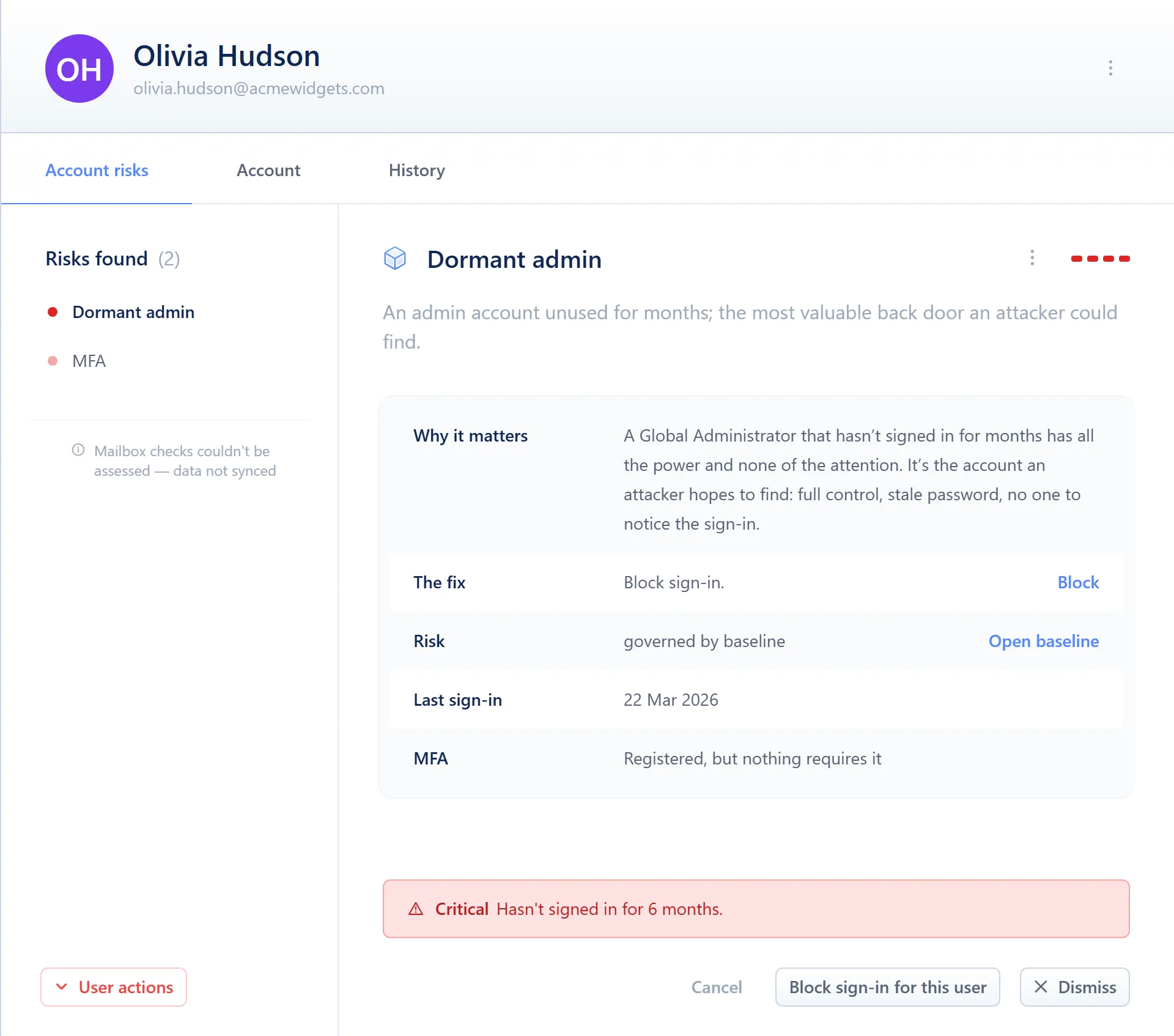
- The user’s other open findings
- Why it matters · The fix · Risk · Last sign-in · MFA
- Dismiss (or Restore) and the fix action
- Account risks — every open finding for this user, with why it matters, the fix, and whether the risk is governed by a baseline (with a link to it) or built in to Octiga.
- History — a timeline of what’s happened to this account: created, dismissed, restored and fixed, each with who and when.
The Account tab
Section titled “The Account tab”Coming soon
This part of Octiga isn't built yet. Check back once it ships.
Dismiss and restore
Section titled “Dismiss and restore”Dismissing a finding takes one click, with no confirmation and nothing to type. Under Needs attention the row leaves the list; under Everything it dims in place instead. Restoring works the same way, from the sheet.
Every dismissal and restore is recorded on the History tab with who did it and when. A finding that later recurs, or gets worse, resurfaces even if an earlier occurrence of it was dismissed.
Actions
Section titled “Actions”Select Resolve on a finding to act on it directly:
| Action | What it does | Minimum role |
|---|---|---|
| Block sign-in | Disables the account and ends every session it currently has open | L1 Read/Write |
| Reset password | Issues a new password, forcing a change at next sign-in | L1 Read/Write |
| Dismiss / Restore | Removes a finding from Needs attention, or brings a dismissed one back | L1 Read/Write |
| Recheck | Re-evaluates every account in the tenant now | L1 Read/Write |
Block sign-in and Reset password are the same two remedies used everywhere else in Octiga. See User remedies for what each one changes and how to reverse it, and for automatic lockout, which can block sign-in on its own the moment a serious risk event happens.