Schemes
A scheme is a named bundle of baselines that you author once and deploy to as many tenants, groups or users as you like. Two choices shape how it behaves: its level (org or user), set when you create it, and its governance mode (Managed or Direct), chosen each time you deploy it. When you’re ready to apply one, see Deploying a scheme.
Org-level and user-level schemes
Section titled “Org-level and user-level schemes”A scheme is one of two kinds, chosen when you create it and fixed from then on.
| Org-level scheme | User-level scheme | |
|---|---|---|
| Targets | A whole tenant | Azure groups and individual users |
| Deployed from | A tenant’s Baselines screen, org-level tab, or the scheme’s own page | A tenant’s Baselines screen, user-level tab, or the scheme’s own page |
| One managed scheme per target | At most one per tenant | At most one per group, and at most one per user |
| Where you author it | Baseline Schemes → the scheme’s own page | Baseline Schemes → the scheme’s own page |
Both kinds are listed together on the Baseline Schemes screen, and Managed and Direct work the same way for both.
Managed and Direct
Section titled “Managed and Direct”Every deploy uses one of two governance modes, and one deploy can’t mix them:
- Managed is a link. The target takes every baseline in the scheme and keeps tracking it: edit the scheme later, and the change reaches every target still linked to it.
- Direct is a snapshot. You pick a subset of the scheme’s baselines, and Octiga copies their values onto the target once. Nothing tracks the scheme afterwards; the copy is independent from the moment it lands.
Everything else about deploying (what a Managed deploy does to a tenant already managed by another scheme, what Direct does to a Managed group, how baselines skipped for licence are reported) follows from this distinction. Deploying a scheme covers each case.
The library screen
Section titled “The library screen”Baseline Schemes lists every scheme you can see, org-level and user-level together, with one search that covers both lists.
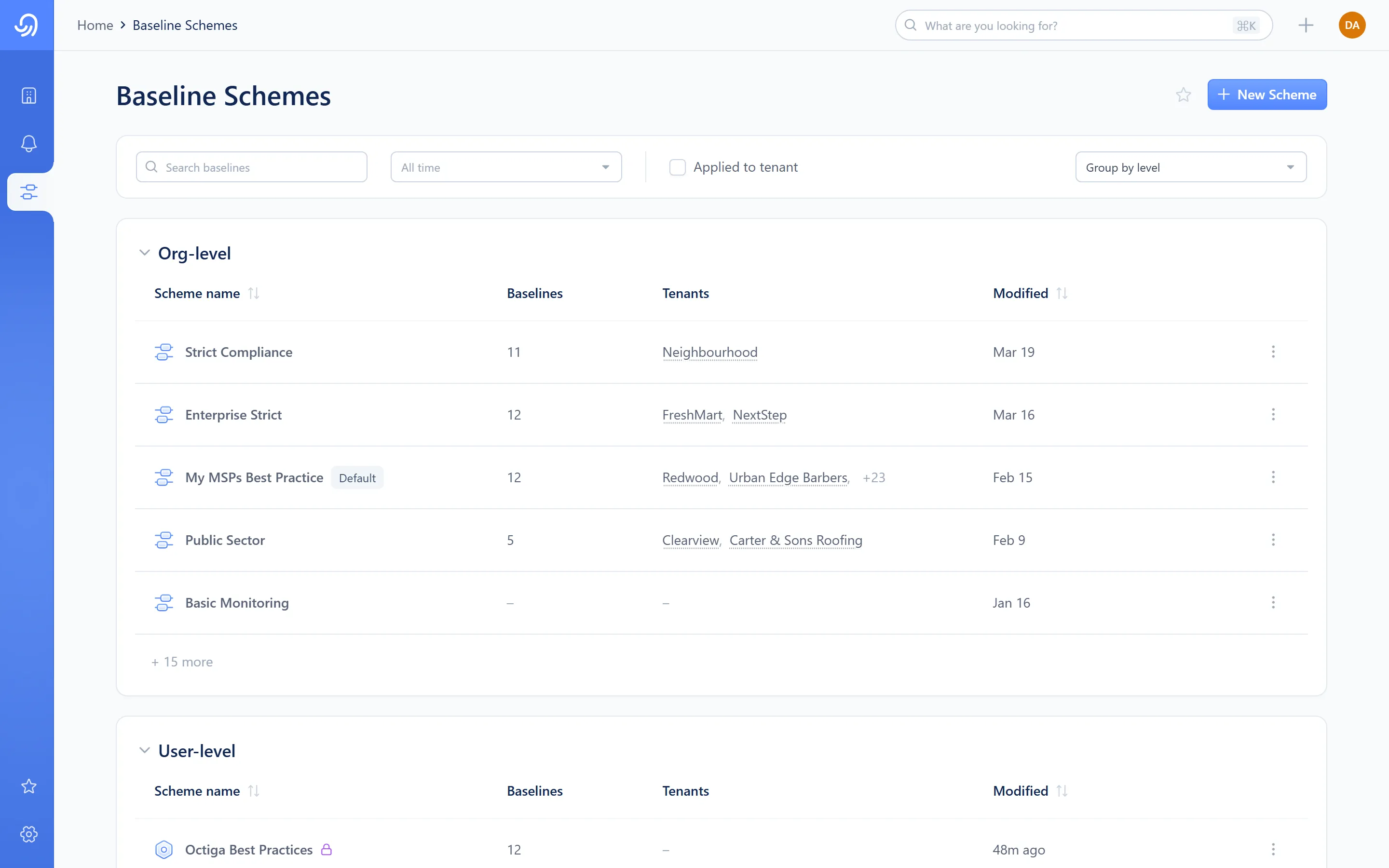
- Search — matches a scheme name across both tables
- Org-level schemes table — name, tenant count, last modified
- User-level schemes table — name, deployment count, last modified
- Row kebab — Deploy scheme, Duplicate, Make default, Delete
Every role can open this screen and see what a scheme contains. Creating, editing, duplicating and deleting schemes, and deploying one from this screen, needs L2 Support or Admin. L1 Read/Write can still deploy an existing scheme to a tenant it reaches, from that tenant’s Baselines screen (Deploying a scheme).
Scheme detail
Section titled “Scheme detail”Opening a scheme takes you to its own page: an editable title, a tenant or deployment count next to a star, and a table of the baselines it carries, grouped by category.
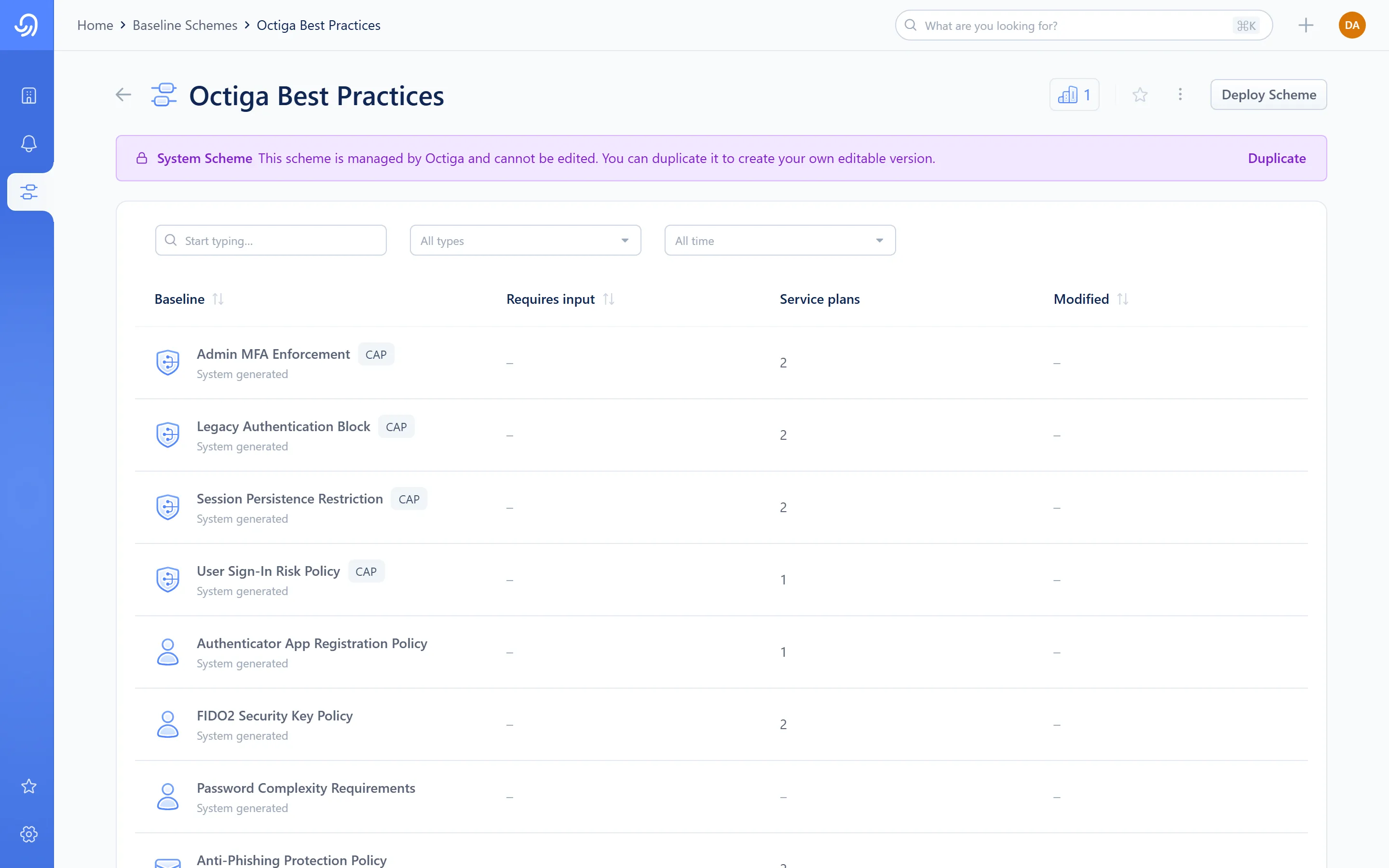
- Editable title
- Tenant count — opens the attached-tenants panel
- Kebab — Deploy scheme, Import baselines, Duplicate, Make default, Delete
- Category-grouped baseline table
A scheme Octiga ships with the product (a system scheme, such as Octiga’s own best-practice bundle) shows a banner explaining that its baselines are read-only. You can’t edit its baselines, but you can still deploy it, make it the default, or duplicate it into an editable copy.
Attached tenants
Section titled “Attached tenants”The tenant or deployment count next to the star opens a panel listing everywhere the scheme is deployed.
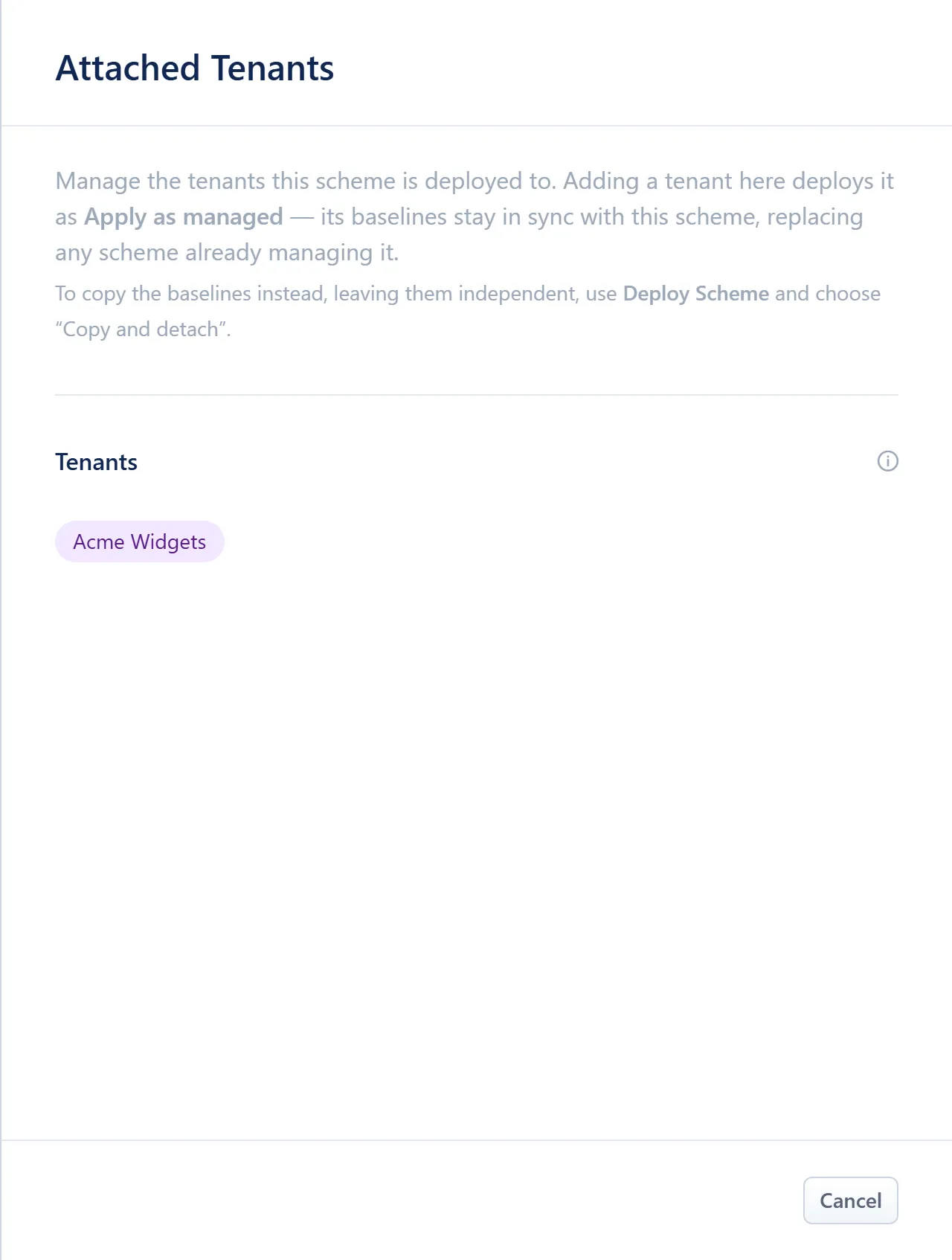
- Attached tenants, as chips
For an org-level scheme, the panel shows the tenants it’s deployed to. On an ordinary scheme, an Add Tenants link (Manage Tenants once one is attached) sits beside the chips so you can add or remove tenants without opening the deploy wizard, and each chip has its own remove control. A system scheme, like the one shown here, has neither: Octiga manages where its bundled scheme is attached, so the panel is read-only and its chips can’t be removed.
For a user-level scheme, the panel is a read-only list of the groups and users following it. A user-level scheme reaches a target only through a deploy, never by attaching it here.
Default scheme
Section titled “Default scheme”One scheme at each level can be the default. Octiga applies the default org-level scheme to a tenant automatically as soon as the tenant finishes connecting, so no one has to remember to deploy it. Set a new default at either level from a scheme’s kebab menu at any time. Changing the default doesn’t affect anything already deployed, and it isn’t reapplied to tenants that already have a scheme.
Vocabulary
Section titled “Vocabulary”- Scheme
A named bundle of baselines, authored once and deployed to many targets.
- Managed
A governance mode: the target takes every baseline in the scheme and keeps tracking it.
- Direct
A governance mode: a chosen subset of the scheme’s baselines, copied once as an independent snapshot.
- System scheme
A scheme Octiga ships with the product. Its baselines are read-only, but it can still be deployed, defaulted or duplicated.